Why Fashion Shoppers Abandon Product Pages (5 Fixes) | Shopify CRO Guide
What you will learn
- The biggest conversion leak: uncertainty
- 1. Static product images answer only part of the question
- 2. Your product page may be hiding important answers
- 3. Shoppers need confidence at the moment of intent
- 4. Do not rely on discounts to solve a confidence problem
- 5. Treat returns as a product-page problem, too
- A practical Shopify product-page checklist
- The goal is not more persuasion. It is better certainty.
A shopper finds your product through an ad, a search result, or Instagram.
They land on the product page. They like the piece. They scroll through the images.
Then they leave.
No add to cart. No email signup. No purchase.
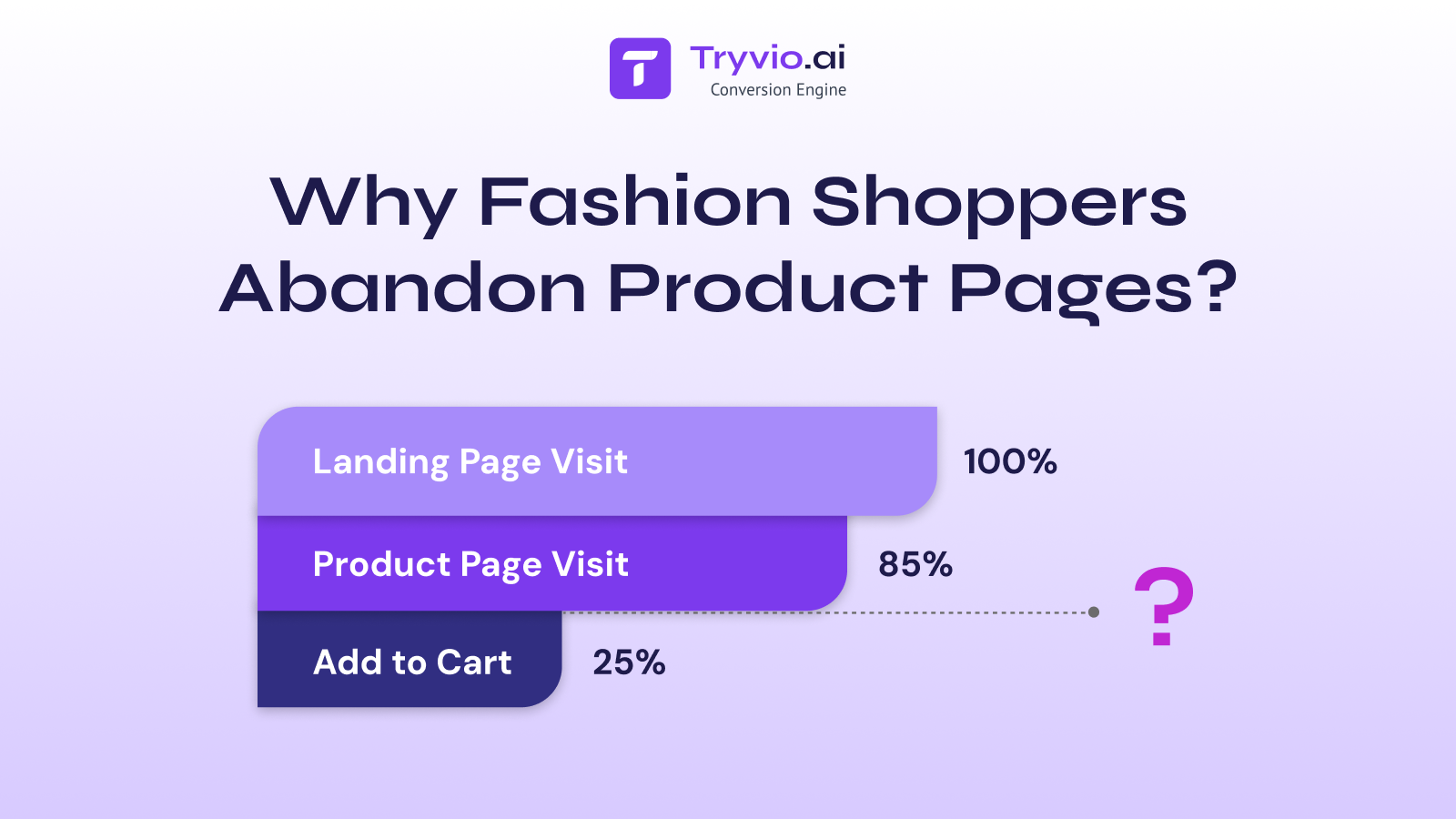
For fashion brands, that moment is easy to misread. It is tempting to blame price, shipping, or the product itself. Sometimes those are the issue. But often, the real problem is simpler:
The shopper does not feel confident enough to buy.
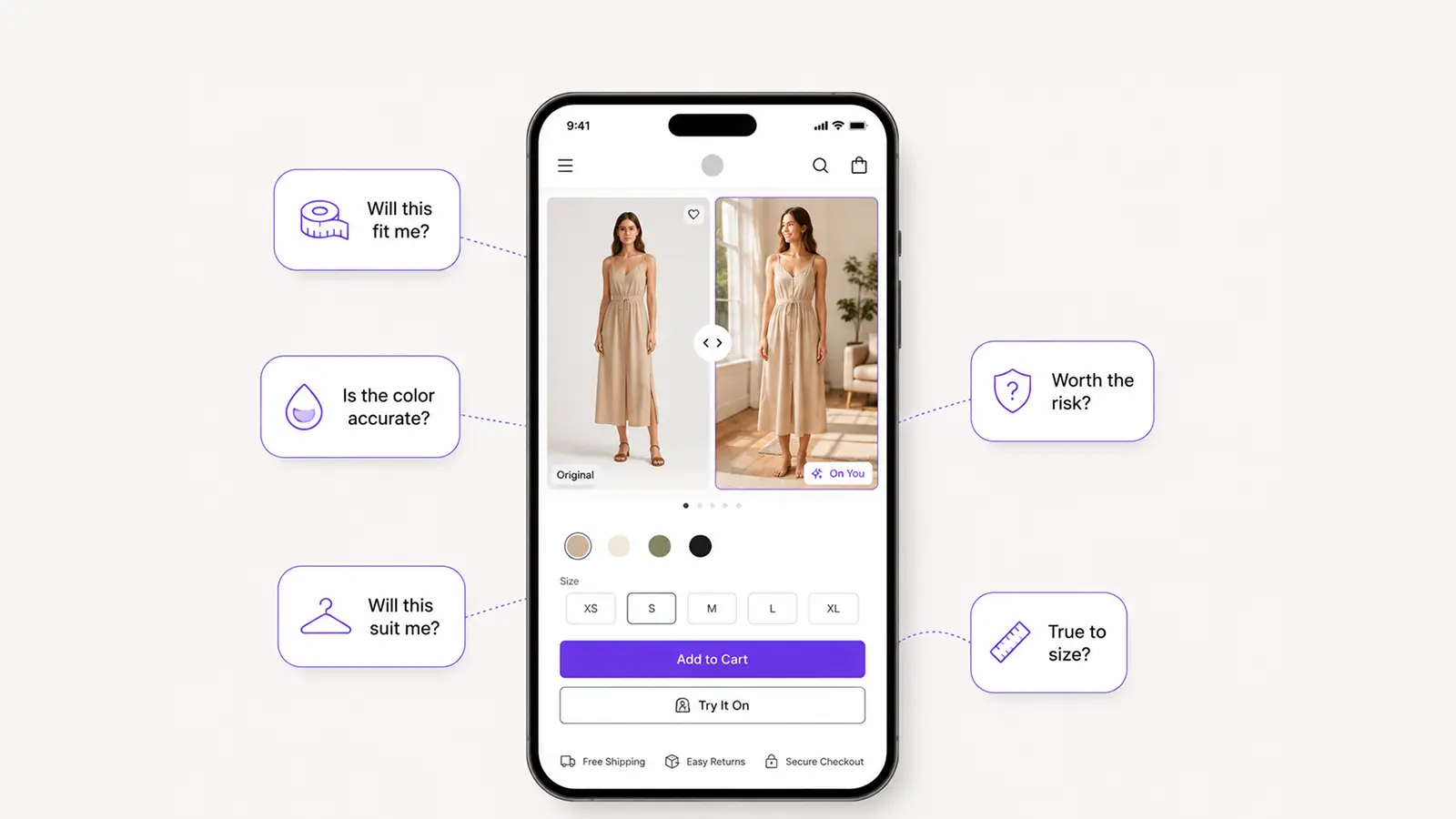
They are asking questions your product page has not fully answered:
- Will this look good on me?
- Will it suit my face, body type, or style?
- Is the color accurate?
- Is the size or fit what I expect?
- Is this worth the risk of ordering and returning it?
A product page is not just a catalogue entry. It is where a customer decides whether to move from interest to commitment.
Here is why fashion shoppers abandon product pages and what Shopify brands can do to give them a reason to stay.
The biggest conversion leak: uncertainty
Fashion is personal. A customer is not only evaluating material, price, or product specifications. They are trying to imagine themselves wearing the item.
That is difficult when the experience is limited to a few studio images and a size chart.
A necklace may look great on a model but feel like a gamble for the person viewing it. A pair of sunglasses may have strong product photography, yet the shopper still cannot tell whether the frame suits their face. The same applies to watches, rings, apparel, footwear, and accessories.
When a shopper cannot confidently picture the outcome, delaying the purchase becomes the safe choice.
And delay usually means one of three things:
- They compare alternatives.
- They forget to return.
- They buy only after a discount - or not at all.
The goal of product-page optimization is not to pressure customers into purchasing. It is to help them make a decision with better information.
1. Static product images answer only part of the question
High-quality imagery is essential. But even excellent product photography has a limitation: it shows the product in a controlled context, not on the individual shopper.
A fashion product page should help customers assess:
- Scale and proportions
- Fit and silhouette
- Texture and detail
- Colour in different settings
- How the product works with a real person, not only a campaign model
Start with the fundamentals:
- Include close-ups, detail shots, and multiple angles.
- Show products on more than one model where possible.
- Add video for movement, scale, and texture.
- Use clear, accurate colour descriptions rather than relying on edited imagery alone.
- Make sizing, measurements, and fit guidance easy to find.
Then consider the next level: helping shoppers see the item on themselves.
For visual categories, AI virtual try-on can close the gap between “I like this” and “I can see myself wearing this.” A customer uploads a photo from the product page and receives a realistic preview in seconds. The experience turns a vague mental calculation into something more concrete.
2. Your product page may be hiding important answers
Many product pages contain the right information, but make customers work too hard to find it.
If someone has to open three accordions, scan a dense description, and leave the page to look for shipping details, the purchase starts to feel like effort. On mobile, that friction compounds quickly.
A good product page prioritises the questions that influence the decision most:
Fit and sizing
Do not treat the size chart as the whole solution. Add clear fit notes such as “runs small,” “relaxed fit,” or “designed for everyday layering.” For accessories, show dimensions against a person or familiar object.
Materials and quality
Explain what the customer is getting in plain language. What is it made from? How does it feel? How should it be cared for? Why does the material justify the price?
Delivery and returns
Hiding return information may improve short-term conversion in some cases, but it rarely builds trust. Make delivery timing, return policy, and exchange options visible near the purchase decision.
Social proof
Reviews should do more than display a star rating. Surface reviews that mention fit, quality, comfort, styling, or specific use cases. Customer photos and videos are particularly valuable because they reduce the gap between polished brand imagery and real life.
3. Shoppers need confidence at the moment of intent
A customer’s attention is highest when they are actively evaluating a product. That makes the product page the right place to support the decision.
The most effective confidence-building elements are close to the purchase action—not buried elsewhere in the customer journey.
Consider adding:
- A concise fit or styling note near the variant selector
- Reviews that answer common objections
- A clear delivery and returns summary near the add-to-cart button
- Low-friction comparison tools for colours, styles, or products
- A virtual try-on experience for products where appearance is central to the purchase
The principle is straightforward: reduce uncertainty before asking for commitment.
For example, Tryvio allows Shopify shoppers to upload a photo and preview fashion products on themselves directly from the product page. Rather than treating try-on as a novelty feature, brands can use it as a confidence layer in the buying journey.
It can also support the rest of the conversion flow. A brand can offer additional try-ons in exchange for an email address, present a relevant incentive after engagement, or direct a shopper to checkout with a discount already applied.
4. Do not rely on discounts to solve a confidence problem
When conversion is weak, the immediate response is often to offer a bigger discount.
Discounts can be useful. But they do not answer the underlying question: Will this product be right for me?
A shopper who is uncertain may still abandon after receiving a discount. Or they may purchase, then return the item when reality does not match expectation.
Before cutting margin, look at whether your product page gives shoppers enough confidence to buy at full value.
Ask:
- Can a first-time visitor understand the product in under 30 seconds?
- Is fit, size, and scale clear?
- Can they see the product in a realistic context?
- Are common objections handled before checkout?
- Is there an easy way to compare options?
If the answer is no, a discount is likely treating the symptom rather than the cause.
5. Treat returns as a product-page problem, too
Returns are often framed as a post-purchase issue. In fashion ecommerce, they frequently begin much earlier.
A customer may order several sizes because the fit information is unclear. They may buy a product expecting a colour or proportion that does not match reality. They may purchase because of a temporary promotion, then reconsider once the item arrives.
Better product-page decision support will not eliminate every return. But it can reduce avoidable ones by helping shoppers make a more informed choice before they buy.
That is why conversion and return rate should be considered together. A product page that increases orders while creating more disappointed customers is not truly improving the business.
The better outcome is confident conversion: more customers completing a purchase because they have a clearer sense of what they are getting.
A practical Shopify product-page checklist
Before driving more traffic to a fashion product page, review these essentials:
-
Clear product imagery from multiple angles
-
Video or motion where it adds useful context
-
Visible fit, sizing, and measurement guidance
-
Straightforward material and care information
-
Reviews that reference fit, quality, and real-world use
-
Delivery and return details near the purchase decision
-
Mobile-first layout with fast, low-friction interactions
-
Helpful cross-sells or complete-the-look suggestions
-
A way for shoppers to compare styles, colours, or products
-
A confidence tool – such as virtual try-on – where it fits the category
You do not need to redesign everything at once. Start with the products that receive the most traffic, have the highest abandonment rate, or generate the most returns. Make one improvement, measure the outcome, and build from there.
The goal is not more persuasion. It is better certainty.
Fashion shoppers abandon product pages when they are left to fill in too many blanks on their own.
The brands that convert more effectively do not merely show products. They make it easier for people to understand fit, imagine the outcome, and buy with confidence.
Strong imagery, clear information, credible proof, and low-friction decision tools all work together. For categories where a shopper needs to see an item on themselves, virtual try-on can make that confidence immediate.
Tryvio helps Shopify fashion brands add AI virtual try-on directly to their product pages – so shoppers can see products on themselves in seconds, buy with more certainty, and give brands a clearer view of the revenue their try-ons create.
Frequently asked questions
Why do fashion shoppers abandon product pages?
Most fashion shoppers don't abandon product pages because of price or shipping alone. They leave because they aren't confident the product will actually work for them — whether it will fit, suit their style, or match the color shown in photos. Static images and generic size charts often leave too many of these questions unanswered, so shoppers delay the decision rather than risk a bad purchase.
How can I reduce cart abandonment on fashion product pages?
Focus on removing uncertainty rather than adding more persuasion. Show products from multiple angles and on more than one model, add clear fit notes (not just a size chart), surface reviews that mention fit and quality, and place delivery and return information near the add-to-cart button. Tools like Tryvio.ai — AI Virtual Try-On - can also help shoppers visualize the product on themselves before buying.
Do discounts actually fix low fashion ecommerce conversion rates?
Not on their own. Discounts can prompt a purchase, but they don't resolve the underlying uncertainty about fit, sizing, or appearance. A shopper who buys mainly because of a discount is also more likely to return the item once it arrives and doesn't match expectations. It's usually more effective to improve product-page clarity first, then use discounts strategically rather than as a default fix.
How can Shopify fashion brands reduce returns?
Many returns start on the product page, not after checkout — unclear sizing, misleading color photography, or vague material descriptions lead shoppers to order the wrong item or the wrong size. Adding detailed fit guidance, accurate color context, honest material information, and virtual try-on for visual categories helps shoppers make a more informed choice before they buy, which reduces avoidable returns.
What is virtual try-on and how does it help ecommerce conversion?
Virtual try-on lets a shopper upload their own photo and see a realistic preview of a product — such as jewelry, eyewear, or apparel — on themselves directly on the product page. Instead of imagining how an item might look, shoppers get a concrete visual, which increases purchase confidence and can lift conversion rates while reducing size- or fit-related returns.
What should be included in a Shopify product-page checklist for fashion brands?
A strong fashion product page should include clear imagery from multiple angles, video for movement and texture, visible fit and sizing guidance, plain-language material and care details, reviews that reference fit and real-world use, delivery and return information near the purchase decision, a mobile-first layout, and a confidence tool such as virtual try-on where relevant to the category.

Related posts


Tryvio adds AI virtual try-on to your Shopify product pages — installed in minutes, measured on your dashboard.
Install Tryvio →